
Browse 54 font families
Ready-made previews and the full සකස්කඩ specimen are available in the app before downloading each font.
Find a font for your next Sinhala project. Preview before you install, try your own text, and manage your fonts and Wijesekara keyboard in Akuru.
Apple Silicon + Intel · 54 distinct font families
Targets macOS 12.0 and newer · ZIP download, 122.7 MB
Download and install the desktop app to browse the complete library, explore designer credits and install the fonts you choose.
Ready-made previews and the full සකස්කඩ specimen are available in the app before downloading each font.
Preview custom text, keep favourites and manage font installations. Original source and usage notes stay with each font.
Explore source-backed designer and contributor profiles inside the app, alongside their credited work.
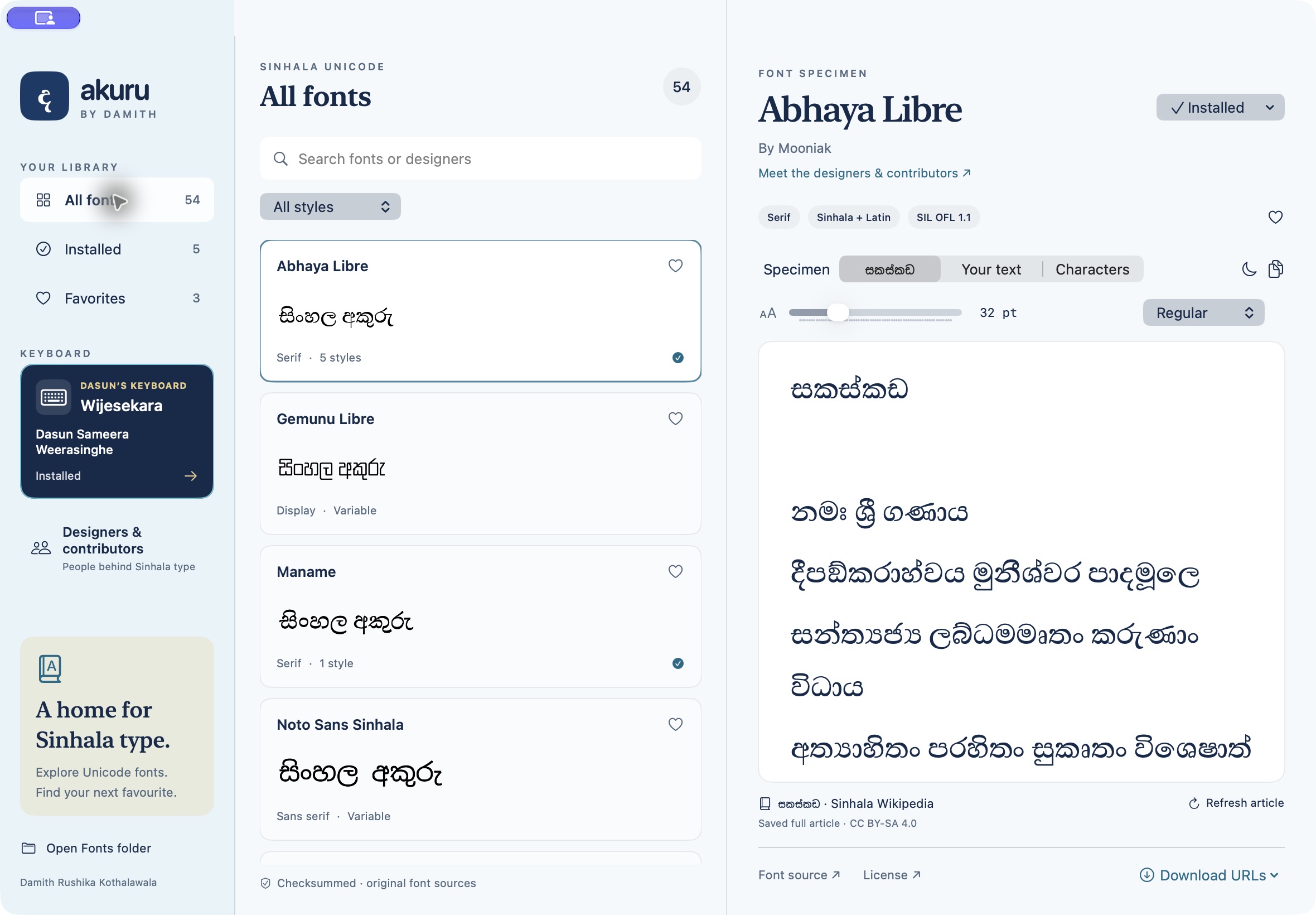
Use Akuru to discover Sinhala type, compare specimens and proof your text before commercial work. Each font’s original terms apply to that use too.
Catalogue downloads come primarily from GitHub repositories, alongside other original font source sites. Akuru reuses matching included or verified cached files when available.
Damith Rushika Kothalawala claims no copyright ownership over third-party fonts. Akuru grants no additional commercial-use, modification or redistribution rights. Each font’s original terms govern.
Review the licence in the app. If it is missing, unclear or does not cover your intended use, obtain the needed permission from the respective designer or rightsholder. A free download is not a licence.

Created by Dasun Sameera Weerasinghe
Open the keyboard section in Akuru to install his layout, check for upstream updates and manage your copy. Original MIT licence and author credit are retained.
The current 2.1.1 download is Developer ID signed and Apple-notarized, with its notarization ticket included.
Browse the font library and open Dasun’s keyboard from the sidebar. Release details and checksum ↗
Earlier Akuru releases, including 2.1.0, were ad-hoc signed and not notarized. Use the current download above for the signed and notarized release. The screenshot and steps below apply to those older versions only.
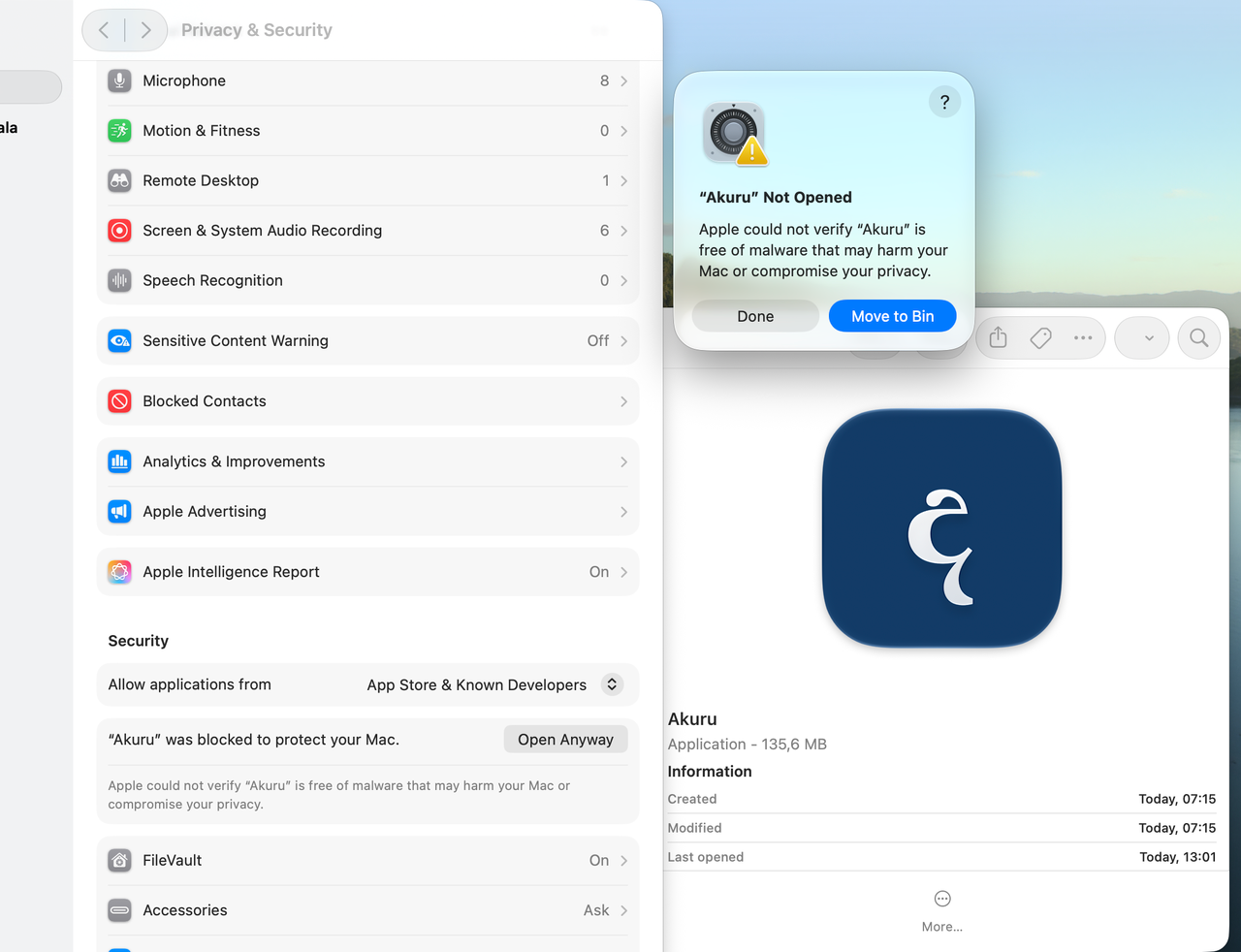
On macOS 12 Monterey: use System Preferences → Security & Privacy → General → Open Anyway. Apple’s Monterey guide ↗
Use this exception only if you trust the download. Read Apple’s official instructions ↗ · Release details and checksum ↗
The full font library and font-download controls are in Akuru. Install the app to browse previews, review each font’s terms and choose what to install. Fonts retain their authors’ original rights and sources.
The direct-download 2.1.1 edition checks for catalog updates when it opens online. Compatible additions appear after a successful refresh, and you choose which fonts to install. Its ready-made previews are bundled; for newly added fonts, load the font to render it or use a later app build with matching previews.
App Store 2.1.1 works offline and receives content through app updates. The planned Store 2.2.0 update adds online catalog checks and verified prepared-preview downloads. Publishing these preview files does not add that capability to older app versions; 2.2.0 is not yet available.
Akuru focuses on Sinhala Unicode fonts. Legacy FM/DL and other non-Unicode fonts that fail the Sinhala Unicode mapping checks are excluded. Duplicate copies, weights and formats do not count as additional families. The current library contains 54 distinct families; original sources and usage notes are available inside the app.
Akuru 2.1.1 is signed with the owner’s Developer ID certificate and notarized by Apple. Its stapled notarization ticket is included in the download. Notarization is Apple’s automated software check; it is not Mac App Store review or approval.
The archive includes Apple Silicon and Intel binaries with a macOS 12.0 minimum. Native UI was reviewed on macOS 27; builds and core checks passed on macOS 26. Native macOS 12 runtime testing remains unverified.
Font terms differ, and some permissions remain unclear. Review each font’s original licence before commercial use, modification or redistribution. If it is missing, unclear or does not cover your intended use, obtain the needed permission from the respective designer or rightsholder. Akuru grants no additional rights; a free download is not a licence.
The designer and contributor directory, source references and original licence notices are included in the desktop app. Dasun’s keyboard is credited to Dasun Sameera Weerasinghe under its original MIT licence. The සකස්කඩ specimen is credited to Sinhala Wikipedia contributors, CC BY-SA 4.0.
The current 2.1.1 ZIP is 122,657,663 bytes. Its SHA-256 is:
36efd31a0eba3b6b075702af4fccd7b1e9af656b4a679f29cb7a2ff008a80b33
Akuru is a community project by Damith Rushika Kothalawala. If it helps your work, share the project with someone who writes or designs in Sinhala on a Mac.
Damith Rushika Kothalawala is a Principal Cloud Architect and Fellow of BCS. His experience spans more than 20 years in enterprise cloud, application modernization, platform engineering, telecommunications, and production operations. Based in Kuala Lumpur, he works across cloud architecture, Kubernetes, DevOps, and AI.
Connect on LinkedIn ↗